Your current reporting
Which of these is how you report today?
Your ledger records what happened. You decide how you read it.
Every way of reporting from a General Ledger starts in the same place: a ledger of flat codes with no company structure. Open the ones that describe you - most teams recognise a way of reporting and a problem or two - to see what changes with Wevo, and take away a Business Introduction written for your situation.
Part 1 - 01 to 08Skip to part 2
How you report today
The systems and processes behind your reporting
01
Separate reports, each with its own fixed view
This is you if your reports are produced by separate processes, each with its own fixed view of the business.
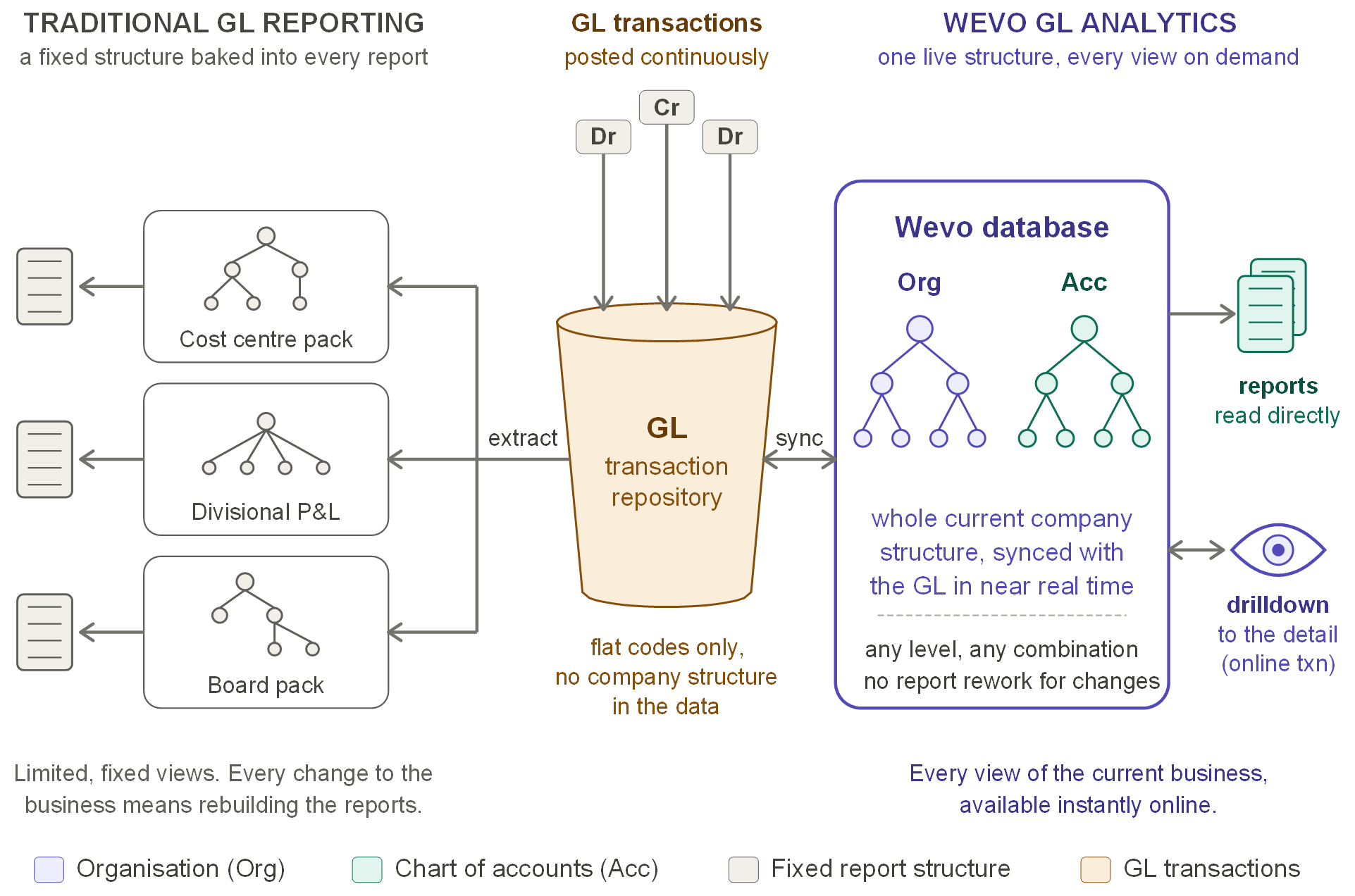
Traditional GL reporting compared with Wevo GL Analytics - Enlarge
Each report is produced by its own process, and each process carries its own fixed view of the organisation and the chart of accounts. The ledger itself holds only flat codes, so every change to the business means rebuilding the reports that depend on it.
One database holds the whole current company structure, organisation and chart of accounts together, synced with the GL in near real time. Reports are read directly from it, and any figure can be drilled down to the detail behind it.
One structure, every view, no report rework.
02
Month-end packs built in Excel
This is you if your management accounts start with a GL export to Excel.
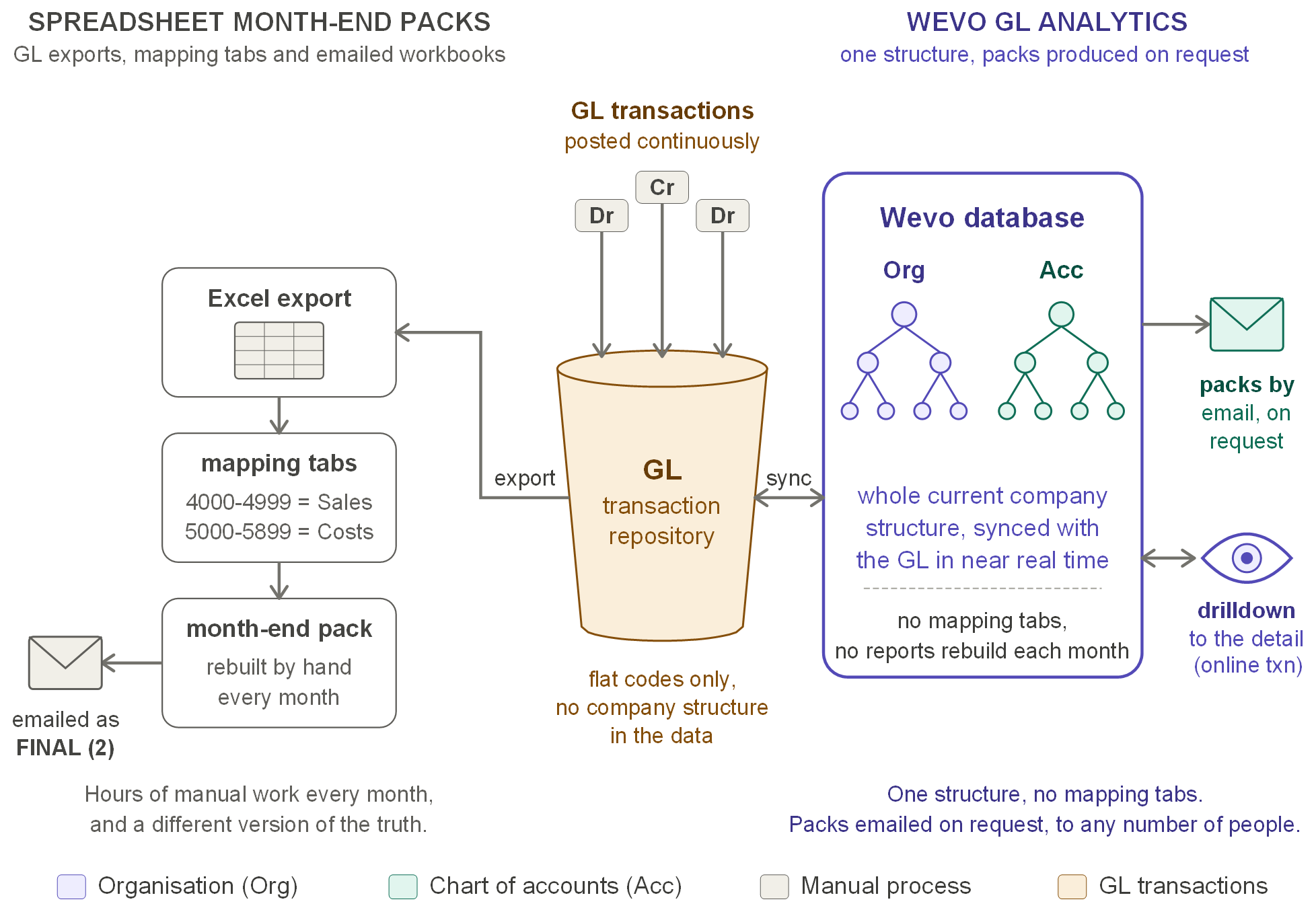
Spreadsheet month-end packs compared with Wevo GL Analytics - Enlarge
You export the GL to Excel each month, map codes to reporting lines on mapping tabs, build the pack by hand and email the workbook. The work repeats every month, the mapping has to be kept up to date manually, and each emailed copy becomes another version of the truth.
One structure, synced with the GL in near real time, replaces the export and the mapping tabs. Packs are emailed on request, and every figure can be drilled down to the detail behind it.
No mapping tabs, no monthly rebuild.
03
Reports defined in your ERP's report writer
This is you if your reports are row and column definitions in your ERP's report writer.
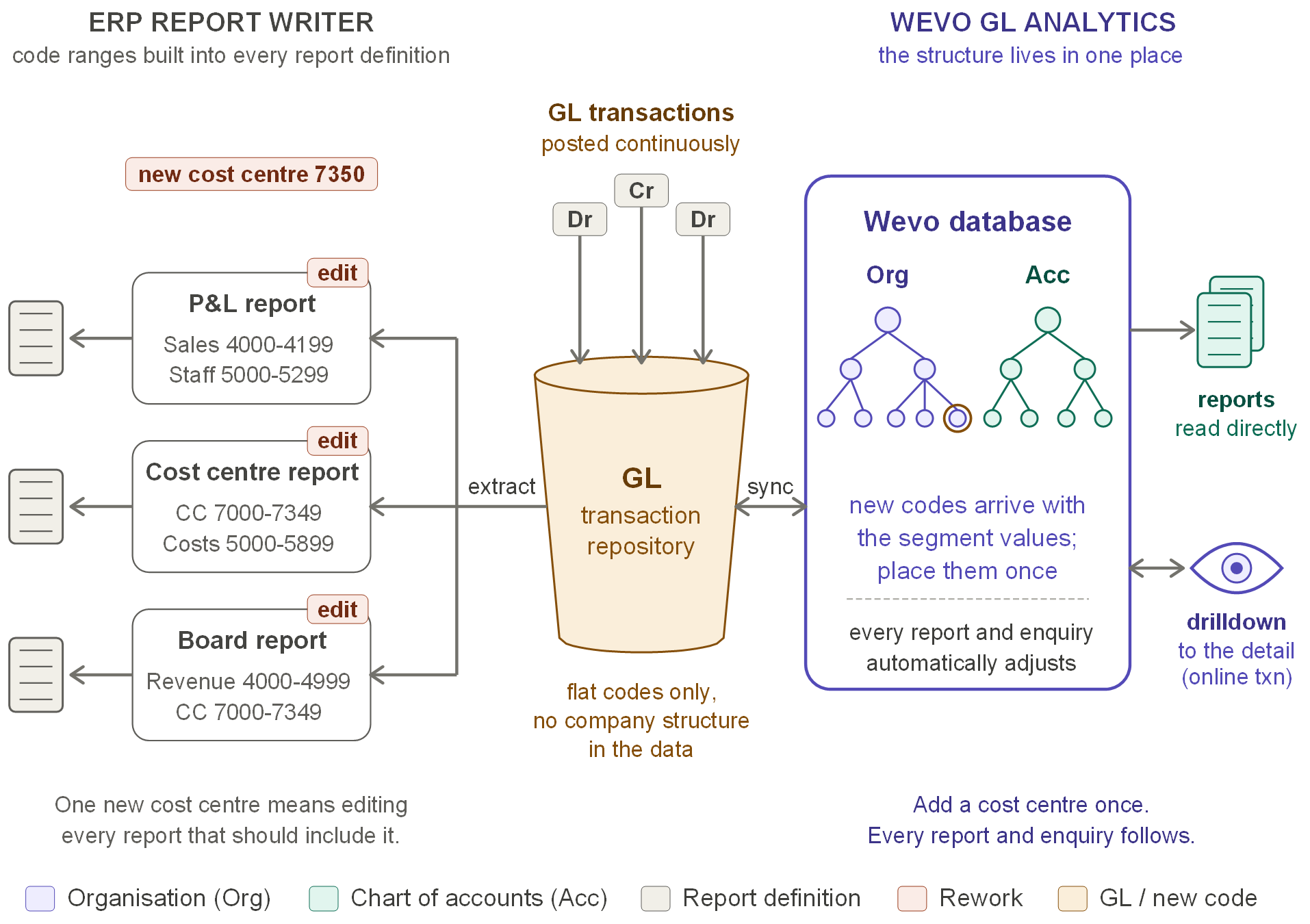
ERP report writer compared with Wevo GL Analytics - Enlarge
Each report has its own rows, columns and code ranges. When the business adds a cost centre, every report that should include it has to be found and edited, and any report that is missed is silently wrong.
The structure lives in one place. New codes arrive with the segment values load and are placed once in the hierarchy, and every report and enquiry follows.
Add a cost centre once.
04
Several ledgers, consolidated in spreadsheets
This is you if your group runs several ledgers, or several charts of accounts, and consolidates them in spreadsheets.
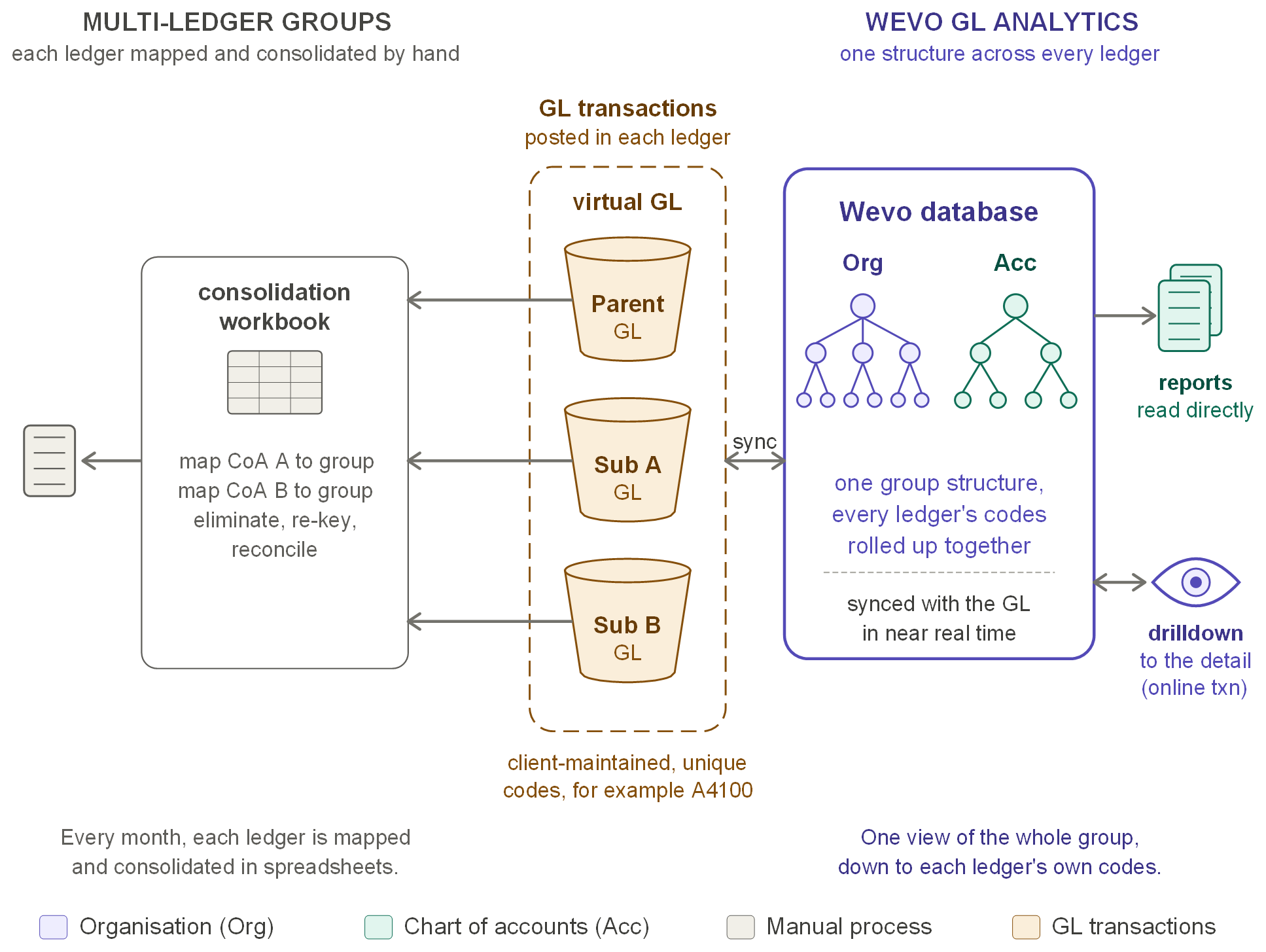
Multi-ledger groups compared with Wevo GL Analytics - Enlarge
Your parent and subsidiaries run separate ledgers, each with its own chart of accounts. Every month each ledger is mapped to the group in a workbook, re-keyed and reconciled before anyone sees a group figure.
The ledgers are presented as one virtual GL with unique codes, maintained by your team. One group structure spans every ledger, synced in near real time, so the whole group is reported in one view and can be drilled down to each ledger's own codes.
One view of the whole group.
05
Deals and reorganisations break your comparisons
This is you if acquisitions, disposals or reorganisations keep breaking your year-on-year comparisons.
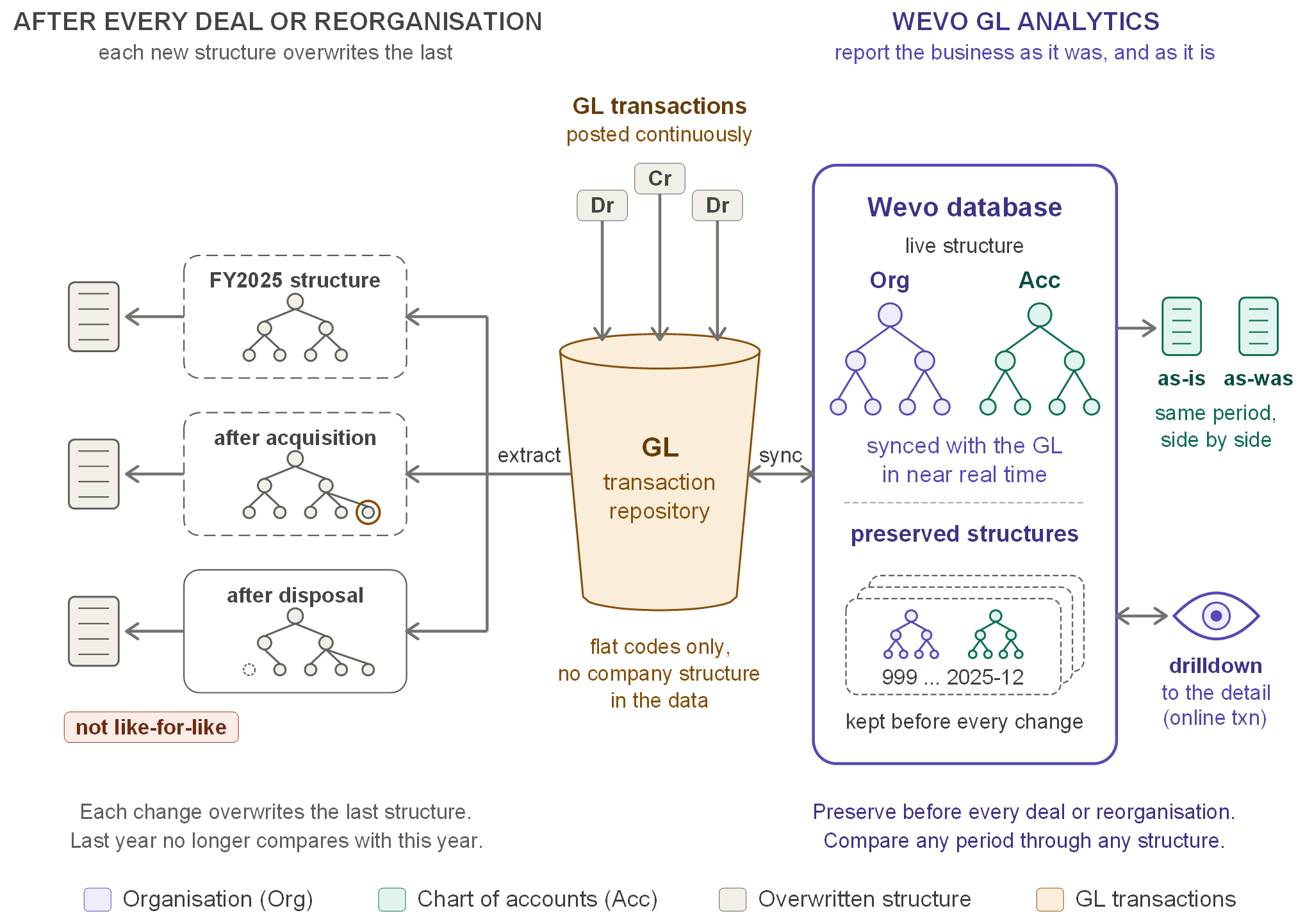
Reporting after deals and reorganisations compared with Wevo GL Analytics - Enlarge
Every acquisition, disposal or reorganisation changes the reporting structure, and the new structure overwrites the old one. Last year's figures no longer compare like-for-like with this year's without manual restatement.
Prior years read through today's structure automatically, and the structure before each change is preserved in one click - no data, under 1 MB, activated when needed. The same period can be reported as the business is now and as it was then, side by side.
Report the business as it was, and as it is.
06
Reports arrive from an overnight run
This is you if your reports arrive from an overnight run in fixed layouts.
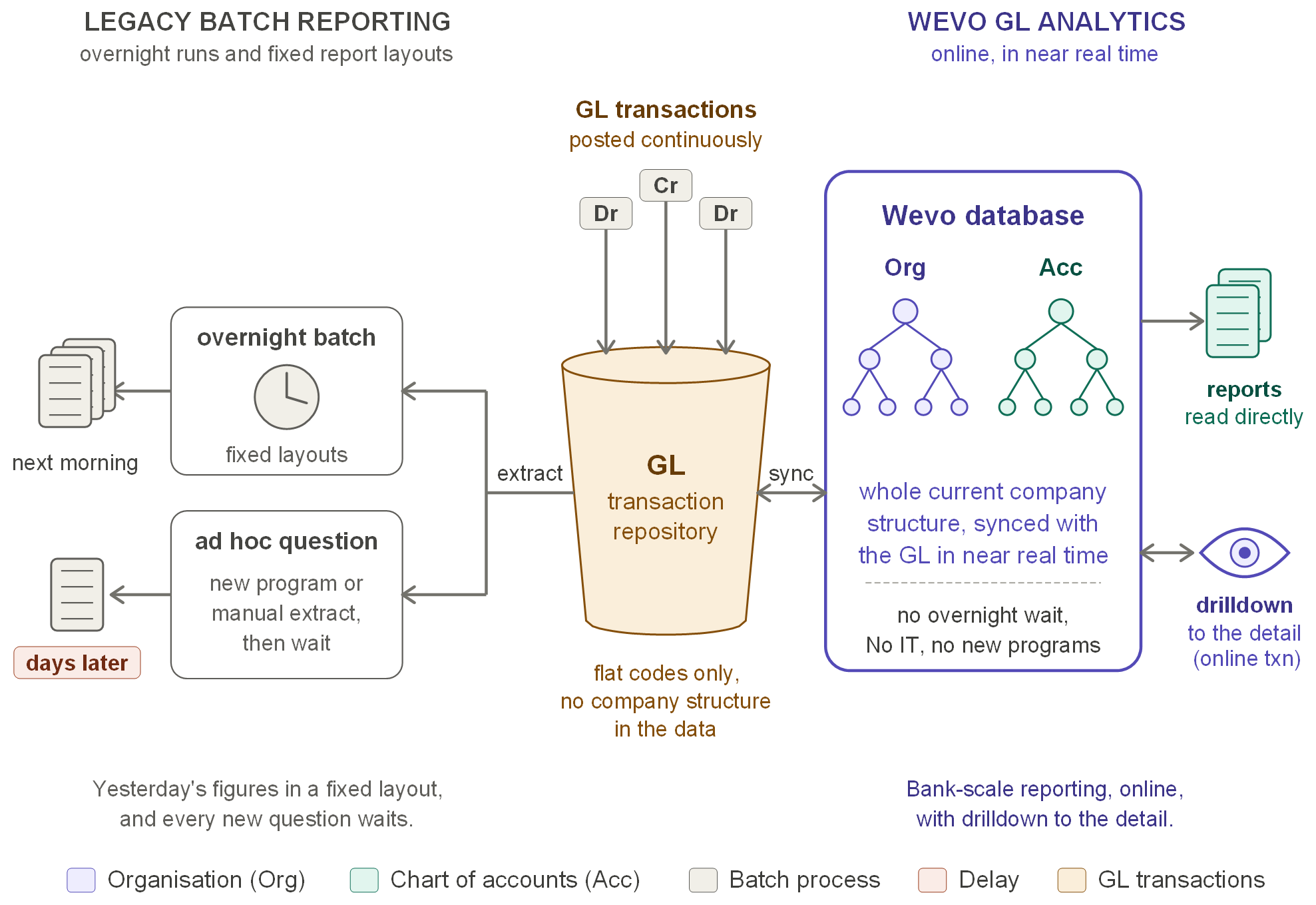
Legacy batch reporting compared with Wevo GL Analytics - Enlarge
Reports come from an overnight run in fixed layouts, so you see yesterday's figures the next morning. A new question needs a new program or a manual extract, and the answer can take days.
The same scale of reporting moves online, minutes behind the GL, with reports read directly and drilldown to the lowest level of detail.
Online, in near real time.
07
Structure changes go through IT
This is you if a structure change means raising a request with your IT or data team.
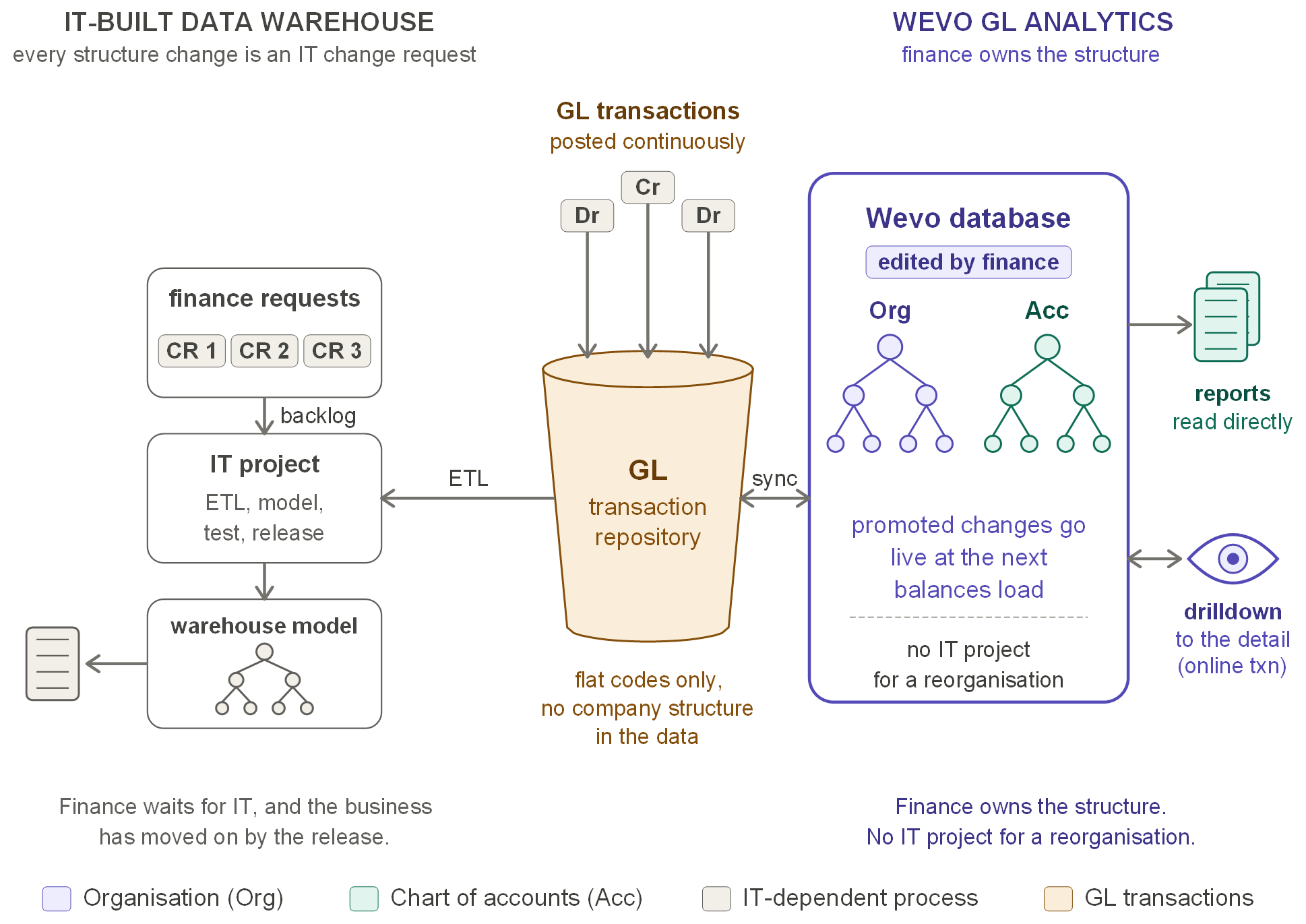
IT-built data warehouse compared with Wevo GL Analytics - Enlarge
Finance raises change requests that wait in an IT backlog, then pass through ETL changes, model rebuilds, testing and release. By the time the change is live, the business may have moved on.
Finance edits the structure itself. Changes are prepared and validated while production carries on, then go live at the next balances load, with no IT project needed for a reorganisation.
Finance owns the structure.
08
You already have an EPM or BI layer
This is you if you already have an EPM or BI model with central hierarchies, loaded from the GL on a schedule.
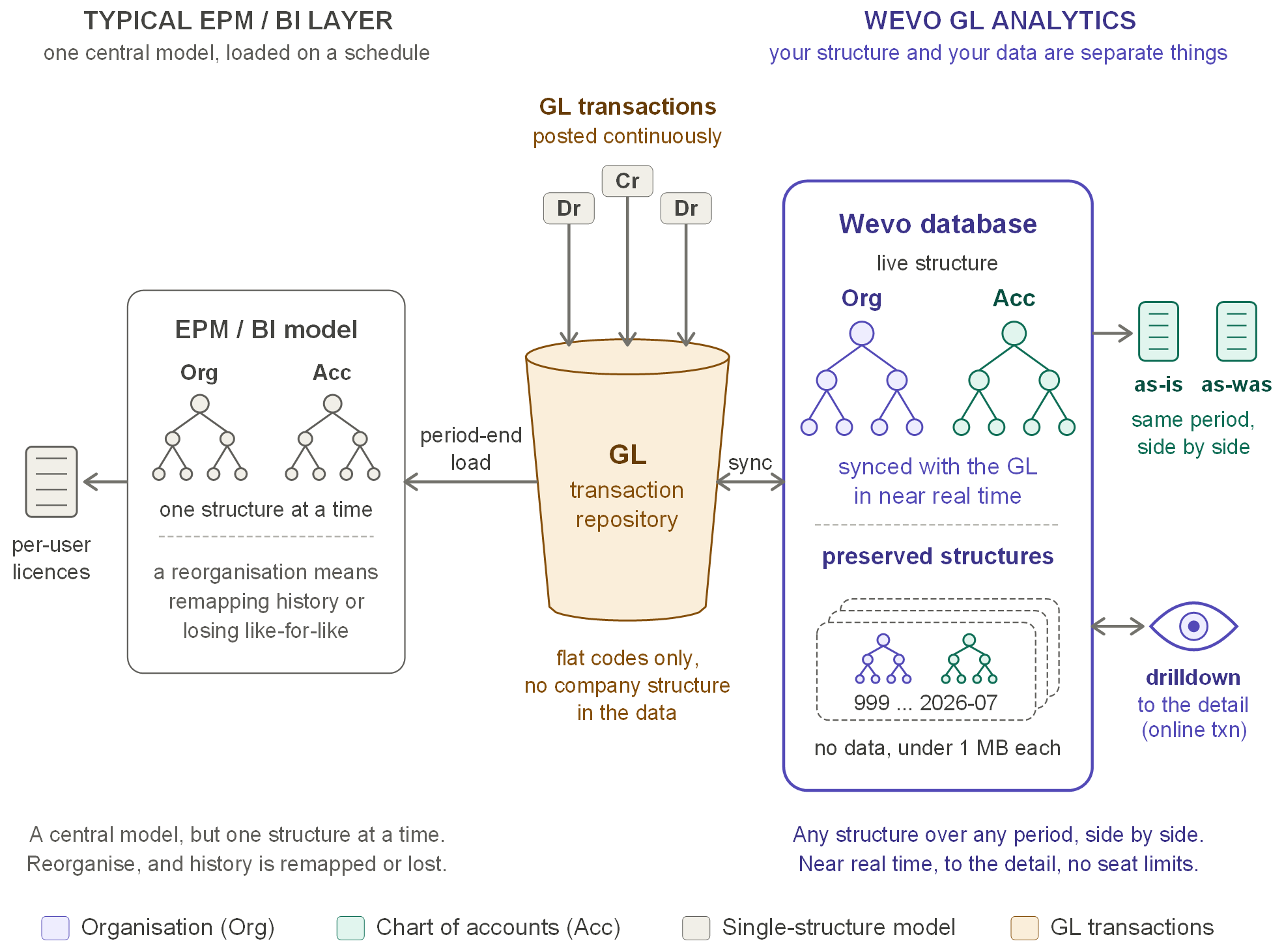
EPM / BI reporting compared with Wevo GL Analytics - Enlarge
Your EPM or BI model holds organisation and account hierarchies, typically loaded from the GL at period end. It holds one structure at a time, so after a reorganisation history is remapped or like-for-like comparison is lost, and access is usually licensed per user.
Structure and data are separate. The live structure is synced with the GL in near real time, and earlier structures are preserved at under 1 MB each, so the same period can be reported through today's structure and an earlier one side by side, with no seat limits.
Your structure and your data are separate things.
Part 2 - 09 to 14Back to top
What makes reporting difficult
The problems that keep finance busy, whatever the system
09
Your chart of accounts isn't how management sees the business
This is you if your chart of accounts was designed for posting, but management wants to see the business by division, region or responsibility.
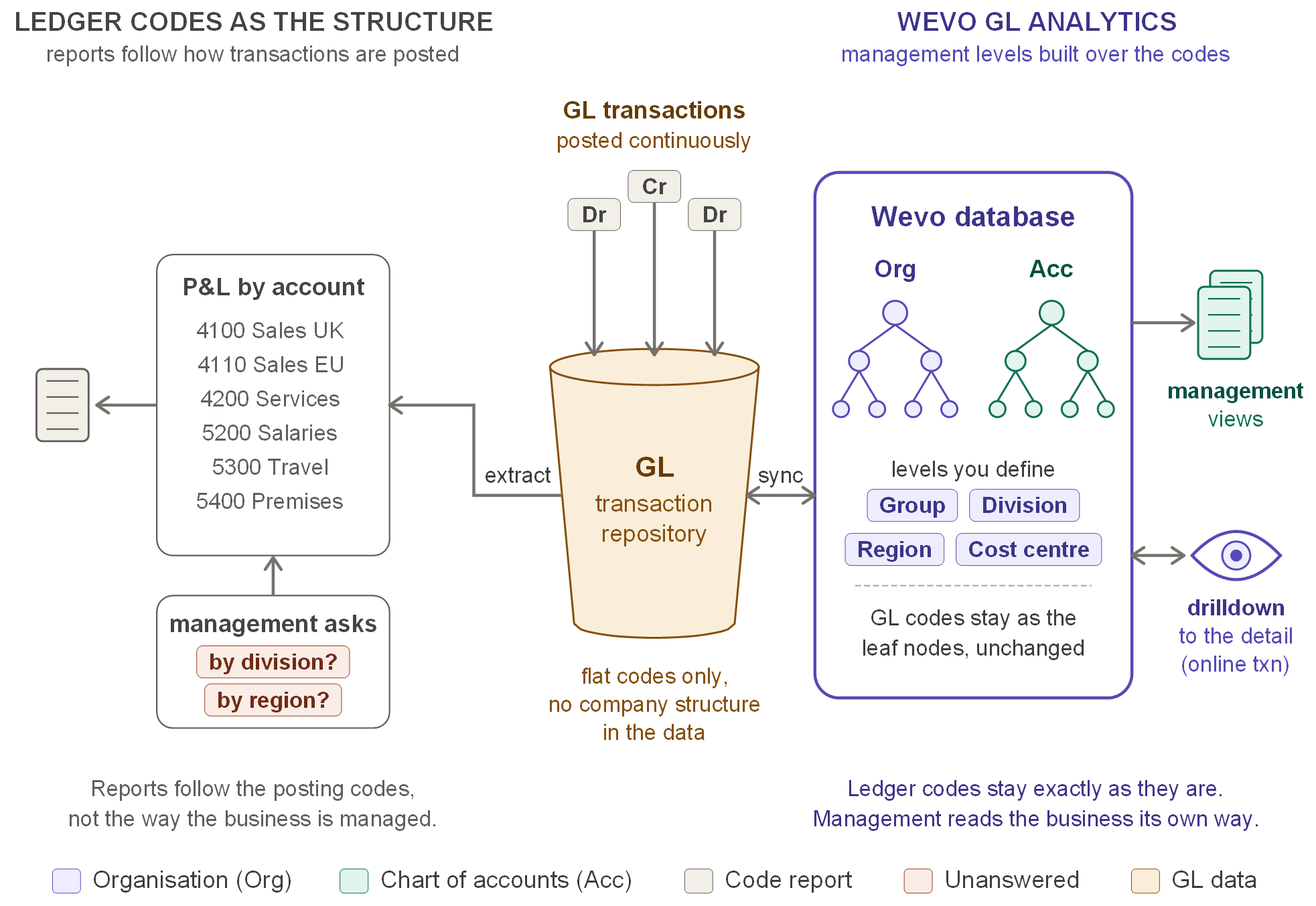
Ledger-code reporting compared with Wevo GL Analytics - Enlarge
Your chart of accounts was designed for posting, so reports follow the account codes. Management asks for the business by division, region or responsibility, and each answer is rebuilt in a spreadsheet.
Hierarchies build the management levels - group, division, region, cost centre - over the ledger codes, which stay unchanged as the leaf nodes. The business is read the way it is managed, without changing how anything is posted.
Ledger codes unchanged, management view on top.
10
Actuals against budget take days to line up
This is you if your budget lives in a spreadsheet and every variance report starts by lining up the codes.
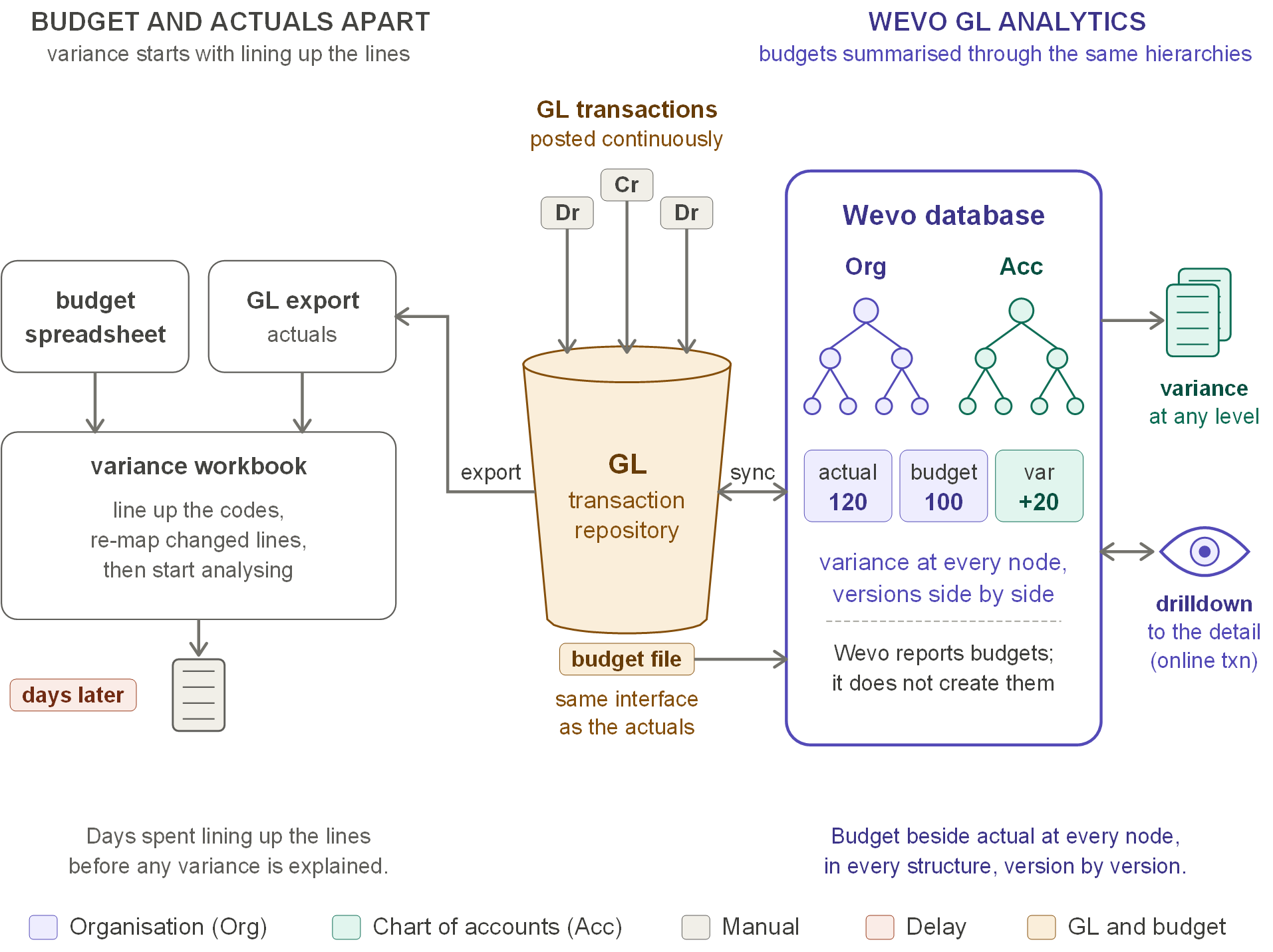
Budget variance compared with Wevo GL Analytics - Enlarge
Your budget sits in a spreadsheet and actuals come from a GL export. Every variance report starts by matching codes, re-mapping lines that changed after the budget was set and checking the totals agree - days before any variance is explained.
Budgets load through the same interface as actuals and are summarised through the same hierarchies, so actual, budget and variance sit side by side at every node, with several budget versions held together. Wevo reports budgets; it does not create them.
Budget beside actual at every node.
11
Late journals leave your reports out of date
This is you if your prior-year comparatives are a copy taken at the close, and every late journal means re-running the pack.

Late and prior-year journals compared with Wevo GL Analytics - Enlarge
Prior-year comparatives are a copy taken at the close. When an audit adjustment or a late journal is posted afterwards, the copy no longer agrees with the ledger, and the current pack has to be re-run.
Every year allocated to Wevo is kept in step with the GL. A prior-year adjustment posted today appears minutes later at every level of both hierarchies, exactly like a current-year posting.
History stays live.
12
The same GL has to serve different audiences
This is you if your statutory accounts, management pack and board pack each keep their own mapping of the same ledger.
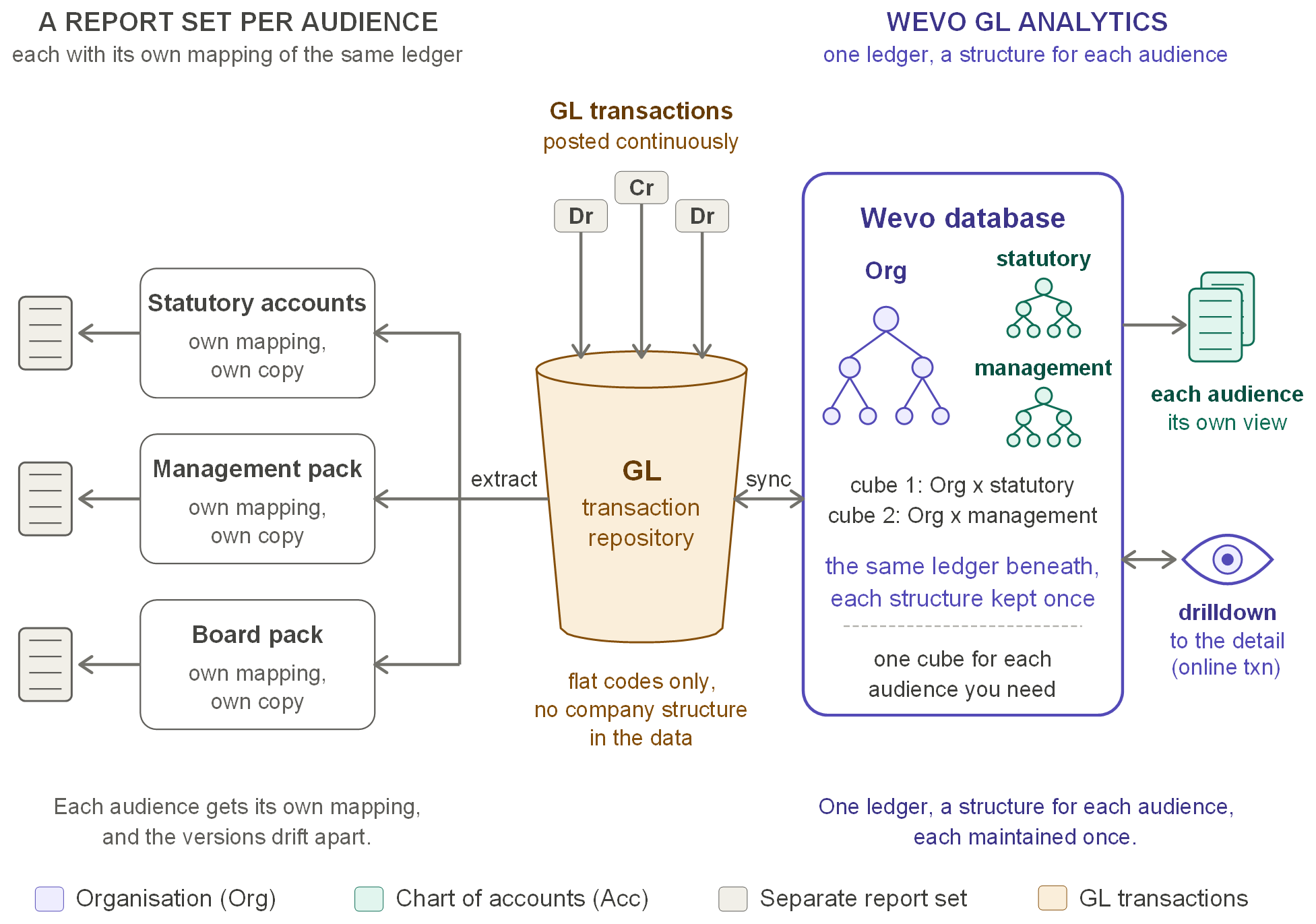
Reporting to different audiences compared with Wevo GL Analytics - Enlarge
Statutory accounts, the management pack and the board pack each keep their own mapping, their own copy and their own reconciliation of the same ledger, and over time the versions drift apart.
Each audience is a cube: the organisation hierarchy paired with the chart of accounts hierarchy that audience needs, over the same ledger data. Each structure is maintained once, and every report for that audience reads from it.
One ledger, a structure for each audience.
13
Budget holders wait for finance to send their numbers
This is you if your managers ask finance for their figures, and finance runs, cuts and emails each report by hand.
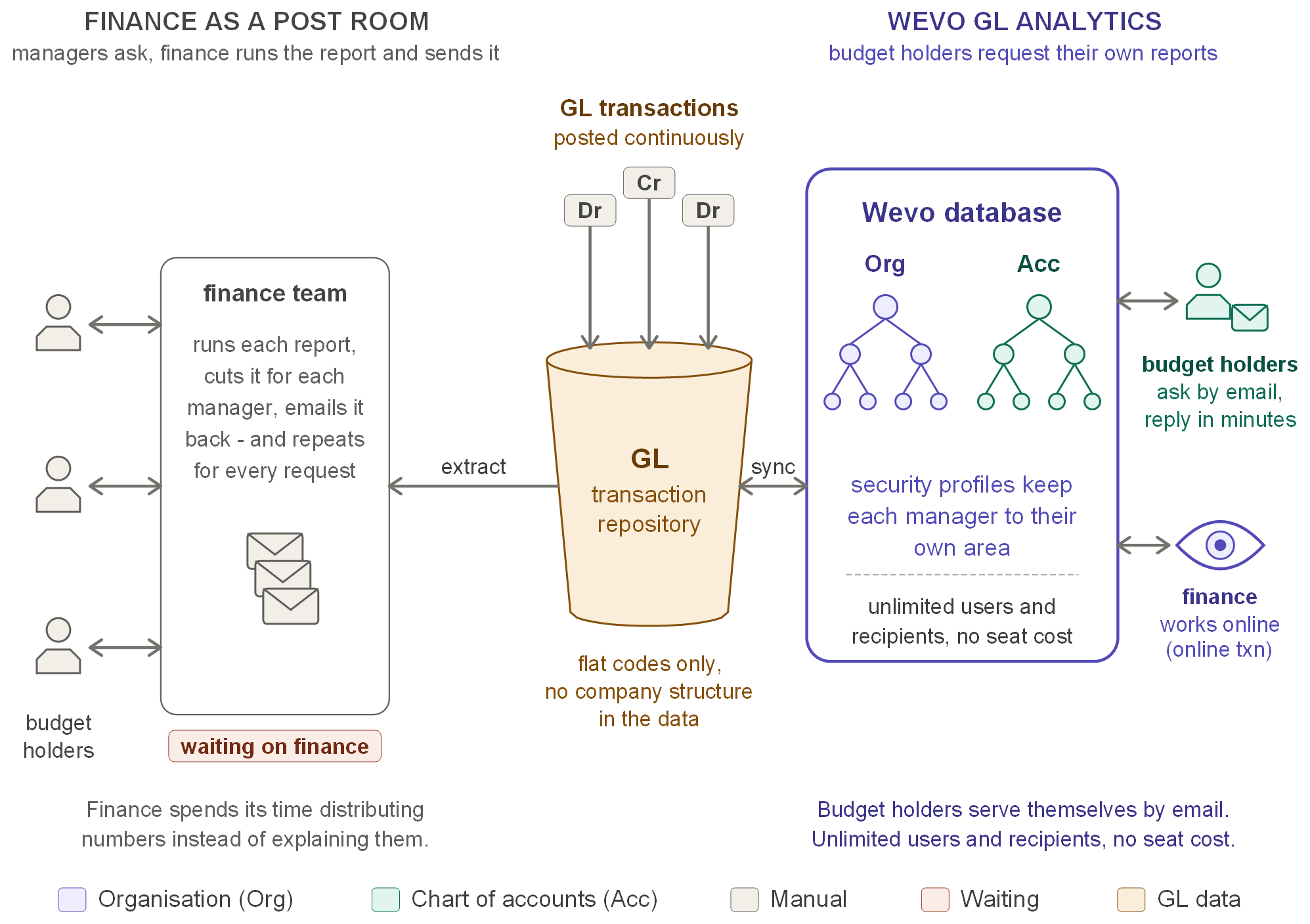
Distributing budget holders' reports compared with Wevo GL Analytics - Enlarge
Budget holders ask finance for their figures. Finance runs the report, cuts it for each manager and emails it back, then repeats the work for every request - time spent distributing numbers rather than explaining them.
Each budget holder requests their own reports through an email form limited to their security profile, and the report returns to their inbox, usually within minutes. Finance works online. Users and report recipients are unlimited, with no seat cost.
Budget holders serve themselves.
14
Close week: you can't see what hit the ledger today
This is you if in close week, a late journal only shows up when the trial balance is run again.
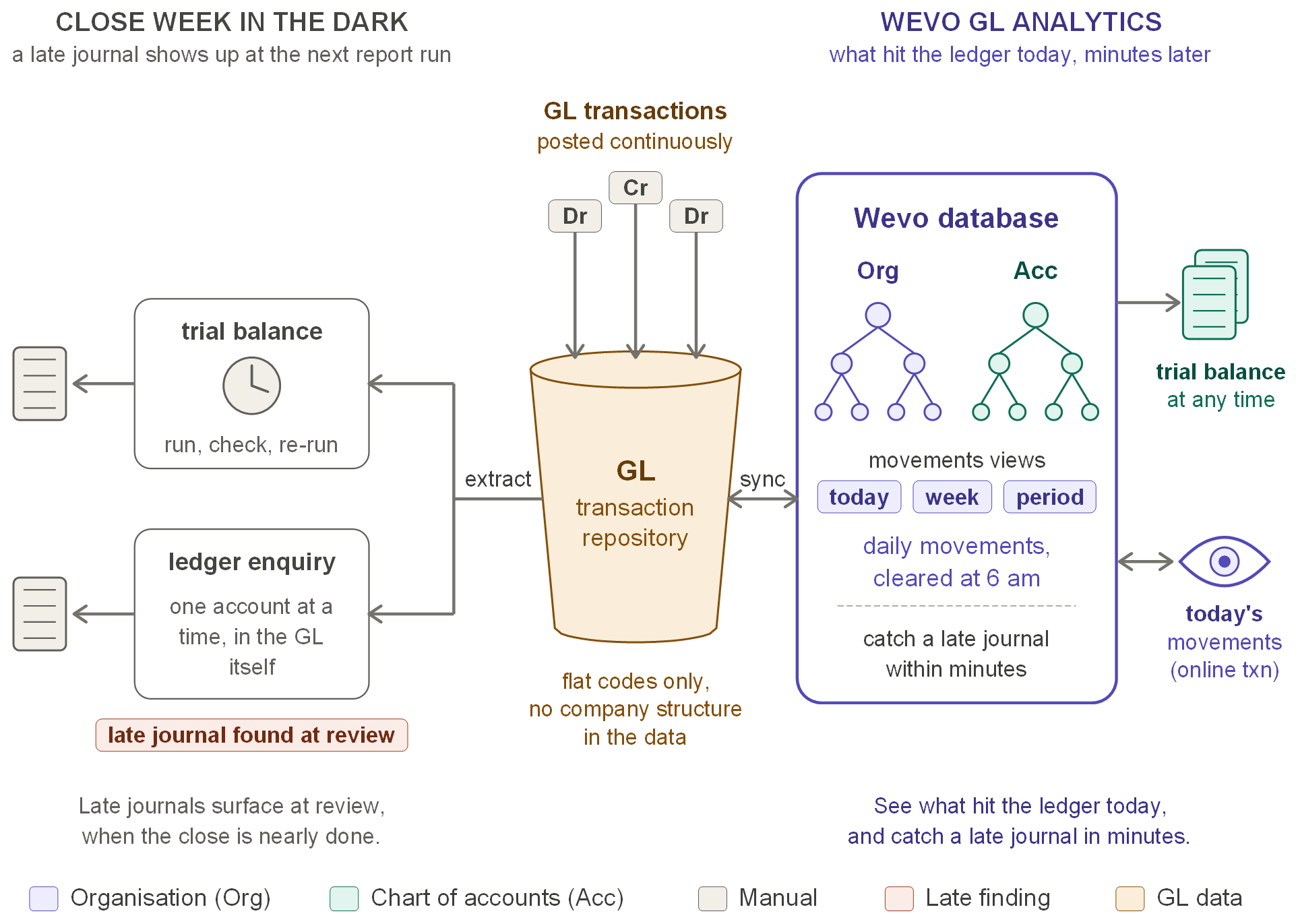
Close-week visibility compared with Wevo GL Analytics - Enlarge
The trial balance is run, checked and run again, and ledger enquiries go one account at a time, so a late or misposted journal is often found only at review, when the close is nearly done.
Movements sit beside the balances: movements since the last cleardown, which you schedule, and daily movements showing what hit the ledger today, minutes behind the GL. A late journal is seen within minutes, at every level.
See what hit the ledger today.
Before you ask
Safe to put beside your ledger
No connection to your GL
Wevo is a read-only reporting layer fed by files your GL already produces. Nothing writes back, and the ledger stays your system of record.
Works beside any GL
If your ledger can produce a CSV extract, Wevo can report from it. There is no connector to buy and no change to how you post.
Runs in your own environment
Installed on your servers or in your own cloud account. Your data never leaves your estate, and no internet connection is needed.
Proven in Tier-1 banking
The reporting approach was first built on IBM mainframes and adopted by major UK clearing banks, and has been re-engineered here as a modern platform.
Not sure which fits, or a mix of several?
Most finance teams recognise more than one. A demo takes about half an hour and runs against a real GL dataset - bring your own questions.
Request a demo